HE
Use cases / Operations
Help Bot
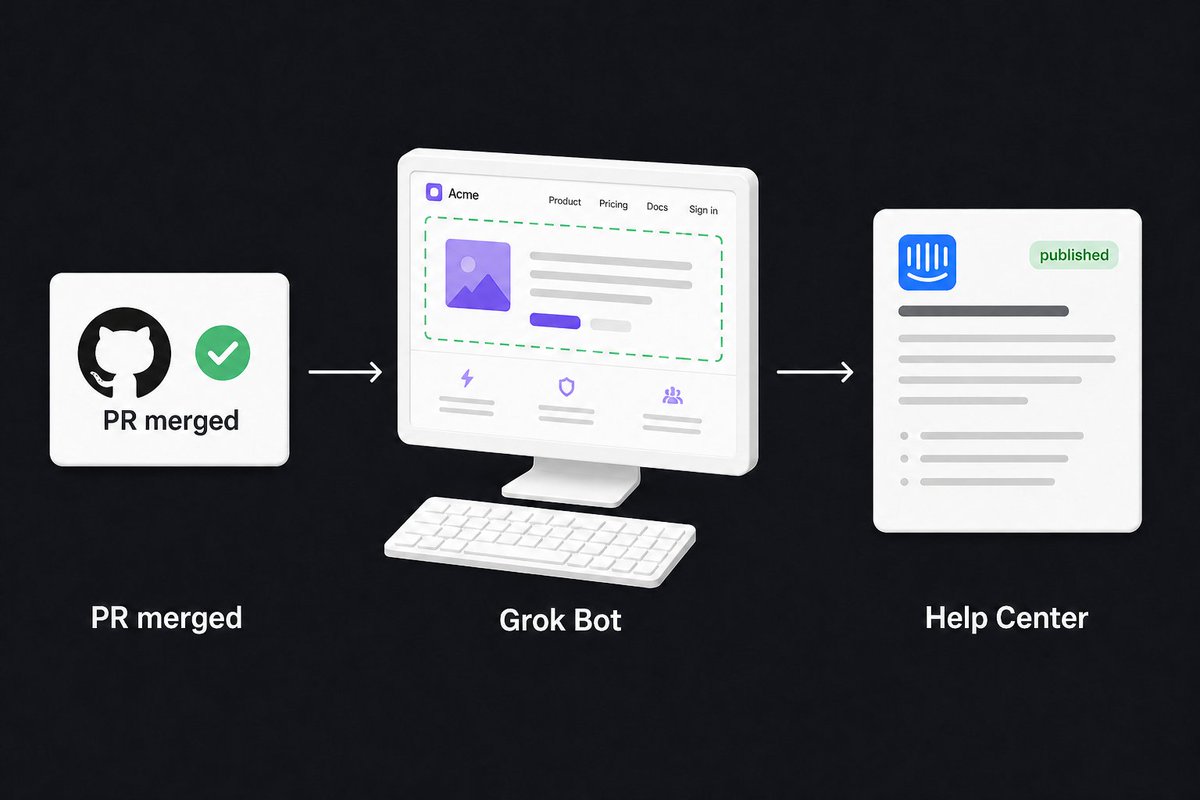
Watches merges and drafts help-article updates with UI screenshots. You still publish.
Author names, descriptions and prompts are preserved as published. Need a starting point? Read the bot selection guide →
The story behind this use case
Day one of Grok Bot, Damon's favorite setup was Intercom plus GitHub. He did not want to babysit help articles. He wanted to build the product.
The Bot has its own computer. He signed the Intercom admin and a Testimonial test account into that browser. The standing job: when a PR gets merged, check whether it changed the UI or a user workflow. If yes, decide whether the Intercom article needs an update. If there is no article, draft a new one. If it needs screenshots, it opens the browser, grabs them from the test account, and drops them into Intercom.
That is the whole gift. Help Center updates stop being a person-shaped chore that trails every ship. The merge is the trigger. The draft and the screenshot are the output. Publishing stays behind him, even though the original post is ready to let the Bot hit publish once the loop is trusted.
Posted on X, Aug 20, 2026. Distinct from his later reminder Bot, which is a ping seat, not a docs seat.
Screenshots & demos
Prompt
This reference prompt was supplied by its author. Review it before giving it to your agent.
Walk me through connecting GitHub and Intercom on this shared computer. Sign into the Intercom admin and a dedicated test account in the browser. Do not use production customer data.

Then save yourself as the Help Center Bot. When a PR is merged, read the diff and decide whether it changed the UI or a user workflow.
- If an Intercom article already covers it, draft the update in Intercom and show me before anything goes live.
- If there is no article, draft a new one with the same stop.
- If you need screenshots, open the test account in the browser, capture the actual UI, and drop the images into the draft. Do not screenshot production customer data.
- If the merge did not change anything a user would see or do, say so and stop.

Hard stop: do not publish, unpublish, or delete Intercom articles. Do not comment on the PR. Do not email users. Return the draft, the screenshots, and why it needs an update. Wait for my yes.

After the first clean merge, save this as a skill and offer a GitHub pr-merged routine that stops at the draft.